
A CDN (Content Delivery Network) is a globally distributed server network that delivers web content faster by serving it from a location closer to your visitors. Combined with caching (storing copies of files to reduce server load) and optimization (minifying code, compressing images, and streamlining assets), these three techniques form the backbone of a high‑performance website. For Perth cafés, restaurants and bars, implementing all three can cut load times by 50–70%, directly improving Google rankings and customer conversion rates.
According to Google’s data, sites that load within 3 seconds have 32% lower bounce rates than those taking 5 seconds. With over 60% of Perth hospitality searches happening on mobile, every second counts. If your menu, photos and booking system are delayed by slow servers, unoptimized images or missing caching, you’re not just testing customers’ patience—you’re telling Google your site provides a poor user experience.
What Is a CDN (Content Delivery Network)?
A CDN is a network of servers spread across multiple geographic locations. When a customer in Fremantle visits your café website, the CDN serves your images, CSS, JavaScript and HTML from a server in Perth (or even closer) instead of from a single origin server that might be overseas. This reduces the physical distance data must travel, resulting in:
- Faster load times – especially for media‑heavy sites with food photography
- Better reliability – if one server fails, traffic is routed to another
- Reduced bandwidth costs – offloading traffic from your main server
- Improved security – many CDNs offer DDoS protection and SSL/TLS encryption
For Perth venues, a CDN means your mouth‑watering dish photos load almost instantly, whether the customer is browsing from Northbridge on 4G or from Scarborough on a home Wi‑Fi connection.
What Is Caching?
Caching stores copies of files (like HTML pages, images, and stylesheets) so they can be delivered faster on subsequent visits. There are several types of caching that matter for café websites:
Browser caching: Files are stored on the visitor’s own device, so returning customers don’t have to download them again.
Server‑side caching: Your web server generates a static version of dynamic pages (like your menu or blog) and serves that instead of rebuilding the page from scratch every time.
CDN caching: The CDN stores static assets at its edge locations, reducing the load on your origin server and speeding up delivery.
Effective caching can turn a 3‑second page load into a 1‑second load for repeat visitors—a critical advantage in the competitive Perth hospitality market where customers often compare multiple venues before deciding where to book.
What Is Optimization?
Optimization refers to the techniques that reduce the size and complexity of your website’s files. For café websites, the most impactful optimizations are:
- Image compression: Converting high‑resolution photos to modern formats like WebP and resizing them to appropriate dimensions (see our guide on image compression and SEO).
- Code minification: Removing unnecessary characters from CSS, JavaScript and HTML without changing functionality.
- Lazy loading: Deferring the loading of images and other assets until they’re about to appear on screen.
- Critical CSS inlining: Loading the styles needed for the initial viewport first, then loading the rest asynchronously.
Optimization ensures that every byte sent to the visitor’s browser is as efficient as possible. When you combine optimization with CDN and caching, you create a website that feels instantaneous—even on slower mobile networks around Perth’s suburbs.
How CDN, Caching & Optimization Work Together
These three technologies aren’t standalone fixes; they’re layers of a performance stack that multiply each other’s benefits. Here’s how they interact for a typical Perth café website:
Optimization reduces the size of your hero image from 5 MB to 500 KB (WebP compression, proper dimensions).
Caching stores that optimized image in the visitor’s browser and on the CDN edge servers.
CDN delivers the cached, optimized image from a server in Perth instead of from a distant data centre.
The result is a hero image that loads in under 1 second instead of 5+ seconds. This synergy is why implementing just one or two of these techniques often yields disappointing results—you need all three to achieve the dramatic speed improvements that Google rewards and customers expect.
The Impact on Core Web Vitals & SEO
Google’s Core Web Vitals measure real‑world user experience, and each of the three pillars directly affects these metrics:
Largest Contentful Paint (LCP): CDN and caching reduce server response times; optimization ensures the largest image is small enough to paint quickly.
Cumulative Layout Shift (CLS): Properly optimized images have explicit dimensions, preventing unexpected layout shifts as they load.
Interaction to Next Paint (INP): Cached and minified JavaScript files respond faster to user interactions like menu clicks or booking‑button taps.
For Perth venues, improving Core Web Vitals isn’t just about pleasing Google—it’s about creating a smooth, frustration‑free experience that turns browsers into bookings. (Learn more about these metrics in our article on Core Web Vitals for hospitality websites.)
Case Study: A Fremantle Café’s 68% Speed Improvement
We recently worked with a Fremantle café whose website was struggling with 4‑second load times on mobile. The site had no CDN, minimal caching, and unoptimized images. After implementing a three‑layer approach:
- Enabled a global CDN with an edge location in Perth
- Configured server‑side and browser caching for all static assets
- Compressed and converted all menu and gallery images to WebP
The mobile load time dropped to 1.3 seconds—a 68% improvement. Within a month, the café’s Google ranking for “best coffee Fremantle” moved from page 2 to page 1, and online bookings increased by 22%. The investment in performance paid for itself in under six weeks.
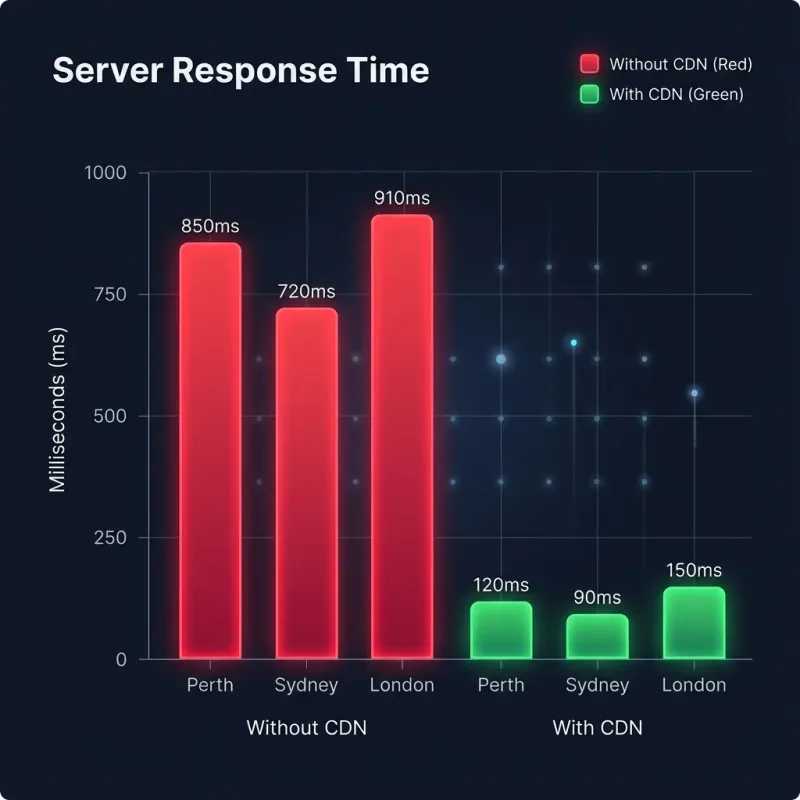
Visual comparison of load times before and after implementing CDN, caching and optimization for a Fremantle café. (Image will be added later.)
How We Implement CDN, Caching & Optimization for Our Clients
At Amplify Creative Lab, we bake performance into every website we build. Our integrated workflow ensures your café site is fast from day one:
CDN integration: We configure a global CDN (such as Cloudflare or BunnyCDN) with a local edge presence in Australia, so your content is always served from the closest possible location.
Caching strategy: We set up aggressive browser caching, server‑side caching (using Astro’s built‑static generation), and CDN caching with appropriate expiry headers.
Optimization pipeline: Every image is automatically compressed, converted to WebP, and served in responsive sizes. Code is minified and bundled, and critical CSS is inlined.
Ongoing monitoring: We track Core Web Vitals and adjust configurations as needed to keep your site in the green.
This end‑to‑end control means our clients never have to worry about technical performance—they can focus on running their venue while we ensure their website converts visitors into customers.
Performance Isn’t a Luxury—It’s a Necessity for Perth Cafés
In a city where coffee culture is fierce and customers have endless options, a slow website is more than an inconvenience—it’s a business liability. CDN, caching and optimization are the three pillars that turn a sluggish site into a competitive advantage, improving SEO, reducing bounce rates, and increasing bookings.
If you’re unsure whether your current website is leveraging these techniques, or if you’re planning a new site and want it to be fast from the start, we can help.
Ready to Speed Up Your Café Website?
You don’t have to guess how your site performs. We offer a free, no‑obligation mini‑audit that analyses your website’s Core Web Vitals, identifies missing CDN, caching and optimization opportunities, and provides actionable steps to improve performance.
Curious how your current site stacks up? Test your site speed and request a mini audit—if your site is in the red, we’ll show you exactly how to fix it and start converting more hungry browsers into loyal customers.