

The Monday morning nightmare every business owner dreads
You sit down with your coffee on a Monday morning, open Google to check your business listing, click your website link, and your stomach drops.
Instead of your homepage, your browser displays a glaring red warning screen:
“Deceptive site ahead. The site you are trying to visit has been flagged for malware or phishing.”
Or worse: your website is still loading, but your header is redirecting mobile visitors to spam pharmaceutical sites, rogue crypto casinos, or fake tech-support popups.
If this has happened to your Perth business, you are not alone.
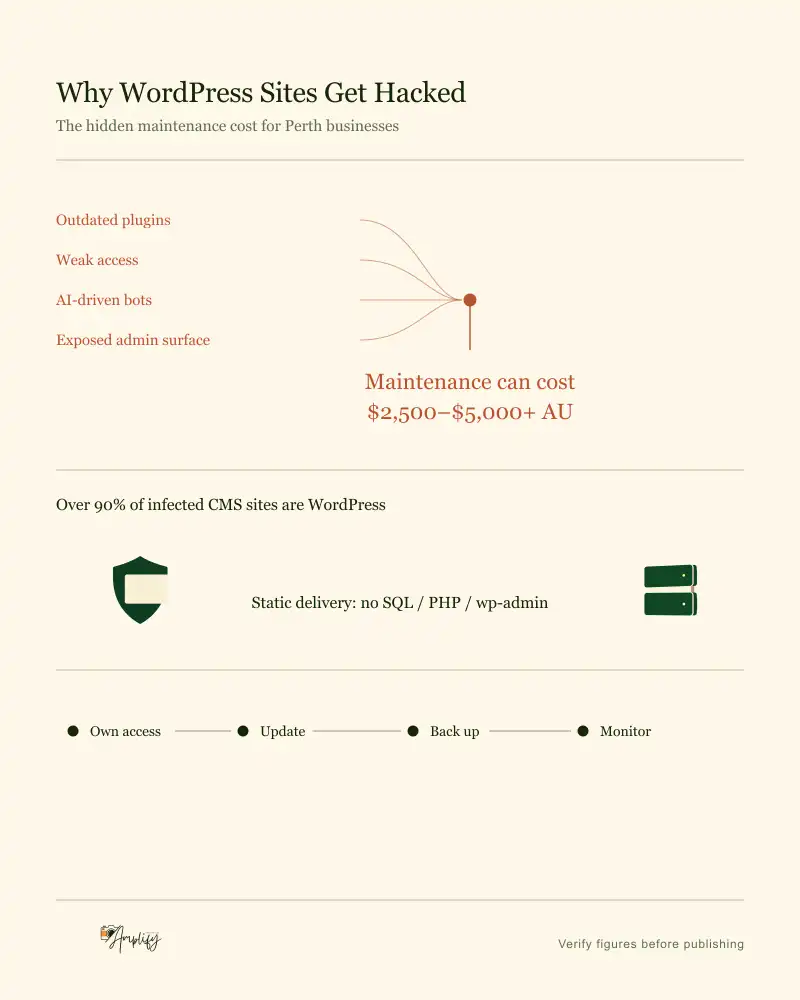
According to security audits by Sucuri and Wordfence, over 90% of all compromised content management systems on the internet run on WordPress.
┌─────────────────────────────────────────────────────────────┐
│             GLOBAL CMS COMPROMISE BREAKDOWN                 │
│                                                             │
│  WordPress:          ████████████████████████████  93.8%     │
│  Joomla:             █░░░░░░░░░░░░░░░░░░░░░░░░░░░   2.4%     │
│  Drupal:             █░░░░░░░░░░░░░░░░░░░░░░░░░░░   1.2%     │
│  All Others:         █░░░░░░░░░░░░░░░░░░░░░░░░░░░   2.6%     │
│                                                             │
│  Source: Sucuri Annual Threat Research Report               │
└─────────────────────────────────────────────────────────────┘
What most agencies won’t tell you before quoting a “cheap” WordPress build is that WordPress is built on a 20-year-old monolithic architecture that requires constant vigilance, endless paid plugins, and expensive monthly maintenance retainers just to stay online.
Let’s break down why WordPress sites get hacked so easily, how the 2026 AI threat landscape has changed the game, and why modern static architectures like Astro are replacing legacy WordPress for good.
1. Why WordPress is inherently vulnerable
To understand why WordPress gets hacked, you have to look at how it works under the hood.
Every time a user visits a traditional WordPress website:
- The server executes dynamic PHP code.
- It queries a live MySQL database to retrieve page copy, user credentials, and settings.
- It executes code from 20 to 40 third-party plugins (forms, sliders, SEO tools, analytics, page builders).
- It compiles the page on the fly and returns it to the browser.
TRADITIONAL WORDPRESS ARCHITECTURE (MASSIVE ATTACK SURFACE):
[Visitor / Hacker]
       │
       ▼
[Public Server Gateway]
       │
       ├─► [/wp-admin / wp-login.php] ──► Brute Force Attack Target
       │
       ├─► [Dynamic PHP Runtime Engine] ──► Remote Code Execution (RCE)
       │
       ├─► [25+ Third-Party Plugins] ──► Unpatched Security Loopholes (CVEs)
       │
       └─► [Live MySQL Database] ──► SQL Injection (SQLi) & Data Exfiltration
The plugin supply chain problem
The core WordPress software is relatively well-maintained. The real danger lies in the plugin ecosystem.
A standard business WordPress site uses plugins developed by 20 different independent developers across the world. If just one plugin author stops maintaining their code or accidentally introduces an unsanitized input field:
- Hackers exploit that single plugin to bypass your login credentials.
- They gain root access to your file directory (
/wp-content/uploads/). - They inject hidden PHP backdoors that survive standard plugin updates.
2. The 2026 threat landscape: How AI weaponised WordPress hacking
In the past, hacking was manual. A hacker had to find your website, identify the software version, and craft a custom exploit script.
In 2026, AI has completely automated the attack pipeline.
Today’s cybercriminals deploy autonomous LLM-powered scanning agents that operate 24 hours a day, 7 days a week:
┌─────────────────────────────────────────────────────────────┐
│             THE 2026 AI-POWERED EXPLOIT CYCLE               │
│                                                             │
│  1. Vulnerability (CVE) Published in a Popular Plugin       │
│     │                                                       │
│  2. AI Botnets Ingest the Vulnerability Details             │
│     │                                                       │
│  3. Autonomous Scanners Crawl Millions of Domains in Mins   │
│     │                                                       │
│  4. Automated Injection of Obfuscated PHP Backdoors         │
│     │                                                       │
│  5. Stealth SEO Spam & Malicious Redirects Activated        │
└─────────────────────────────────────────────────────────────┘- Zero-Day Vulnerability Scraping: The millisecond a security vulnerability (CVE) is registered for Elementor, Contact Form 7, or WooCommerce, AI botnets parse the release notes to understand the exact flaw.
- Mass Automated Crawling: AI bots scan hundreds of thousands of Australian websites per minute, checking your HTTP headers to see which plugin versions you are running.
- Instant Automated Injection: The AI bot sends an automated payload to exploit the unpatched form or database query, injecting obfuscated malware before you or your agency even know an update exists.
- Stealth Operation: Modern AI malware does not deface your homepage immediately. It deliberately hides from you by checking the visitor’s IP address. If you visit from Perth, the site looks normal; if a visitor comes from Google Search, it stealthily redirects them to spam domains.
3. The true maintenance cost for Australian businesses
When agencies sell a WordPress website for $3,000, they rarely mention the ongoing operational costs required to keep that website secure and functioning.
Here is what an Australian business typically spends over a 3-year lifecycle:
| Expense Item | Typical Annual Cost (AUD) | 3-Year Total (AUD) |
|---|---|---|
| Plugin Licenses (ACF Pro, Elementor, WP Rocket, Form Tools, Security) | $600 – $1,200 | $1,800 – $3,600 |
| Agency Maintenance Retainer ($150 – $350/month for updates & backups) | $1,800 – $4,200 | $5,400 – $12,600 |
| High-Performance Managed WP Hosting (WP Engine / Kinsta) | $450 – $1,200 | $1,350 – $3,600 |
| Emergency Malware Cleanup & Blacklist Removal (1–2 incidents) | $1,000 – $3,500 | $1,000 – $3,500 |
| Total Ongoing Cost: | $3,850 – $10,100 / yr | $9,550 – $23,300 |
This is the hidden cost of WordPress. You don’t just pay to build the website; you pay an endless “security tax” every single month to prevent your site from collapsing under its own plugin weight. Calculate exact costs for a modern, secure rebuild with our instant website quote builder or explore our bespoke web development Perth services.
4. The modern alternative: Static & Headless architecture (Astro)
What if you could build a website that is structurally impossible to hack using traditional CMS attack vectors?
This is why top frontend engineers have moved away from legacy monolithic CMS platforms in favour of modern static site generators like Astro.
AMPLIFY STATIC / ASTRO ARCHITECTURE (ZERO ATTACK SURFACE):
[Visitor / Hacker]
       │
       ▼
[Global Edge CDN (Cloudflare / AWS)] ──► Serves Pre-Built Static HTML & CSS
       │
       ├─► No MySQL Database to Inject
       ├─► No PHP Runtime to Execute Malware
       ├─► No /wp-admin to Brute Force
       └─► Instant 99+ Performance & Immune to CMS Exploits
Why Astro websites are virtually unhackable:
- No Live Database: An Astro website pre-renders your pages into static HTML, CSS, and lightweight JavaScript at build time. When a hacker attempts an SQL injection (
' OR 1=1 --), there is no database listening on the server. The attack fails instantly. - No PHP Runtime: Static files are served directly from global edge CDNs (Content Delivery Networks). There is no server-side PHP engine to execute malicious backdoors or unauthorized scripts.
- No
/wp-adminLogin Portal: There is no administrative login endpoint exposed to the internet. Hackers cannot run brute-force password cracking bots against a login form that does not exist. - Zero Plugin Bloat: Instead of stacking 30 third-party plugins that fight each other for memory, functionality is cleanly engineered into the codebase. You never have to worry about a plugin update breaking your checkout or contact forms.
5. Architectural comparison: WordPress vs. Amplify Modern Web Stack
| Feature / Metric | Legacy WordPress Site | Amplify Modern Build (Astro) |
|---|---|---|
| Security Risk Profile | High (Target of 90%+ global CMS attacks) | Virtually Zero (No database or PHP on server) |
| AI Bot Vulnerability | Critical (Plugin CVEs exploited automatically) | Immune (Static files cannot execute arbitrary scripts) |
| Admin Attack Surface | Exposed (/wp-admin, xmlrpc.php) |
None (Decoupled headless git-based workflow) |
| Google Lighthouse Speed | Typically 35–65 / 100 on mobile | 95–100 / 100 out of the box |
| Plugin Subscription Fees | $600 – $1,200+ every year | $0 / year |
| Update Anxiety | High (Updates frequently crash layouts) | Zero (Immutable deployments with instant rollbacks) |
| Hosting Cost | $40 – $100+/mo for dedicated WP servers | $0 – $20/mo on global edge networks |
6. How Amplify Creative Lab builds safe, lightning-fast sites in Perth
At Amplify Creative Lab, we believe business owners should focus on running their business—not worrying about whether their website will survive the next round of plugin updates.
When you work with us:
- Direct-to-Developer Engineering: You collaborate directly with a senior Perth-based developer who writes clean, bespoke code without relying on bloated off-the-shelf themes.
- Modern Edge Deployment: Your website is deployed across global CDN edge nodes, guaranteeing sub-second load times for customers in Perth, Sydney, Melbourne, and internationally.
- Bulletproof Architecture: We build on modern frameworks like Astro and Next.js, eliminating database vulnerabilities while delivering flawless Core Web Vitals.
- 100% Asset Ownership: You retain full ownership of your code repository, DNS, and hosting accounts—no hostage hosting, no locked doors.
If you are tired of the WordPress update treadmill, check our web development Perth services and our ongoing website maintenance & performance SLAs.
What to do if your WordPress site is currently infected
If your website has already been flagged by Google or is exhibiting suspicious redirects, take these immediate triage steps:
- Take an immediate backup: Download your current database and
wp-contentfolder before attempting any cleanup. - Scan with server-level tools: Don’t rely solely on free WordPress plugins, as advanced malware hides inside the database or core system files. Ask your web host to run a deep maldet scan.
- Change all credentials: Reset your MySQL database password, FTP/SFTP logins, hosting control panel passwords, and WordPress admin credentials.
- Consider a permanent rebuild: If a WordPress site has been hacked multiple times, malicious backdoors are often deeply embedded across hundreds of files. Migrating to a clean, custom Astro build is usually faster, cheaper, and permanently solves the security problem.
Upgrade to a platform that never sleeps on security
Your website is your most valuable 24/7 digital storefront. Leaving it exposed to automated AI botnets and legacy plugin vulnerabilities is a gamble your business doesn’t need to take.
Ready to leave WordPress security headaches in the past? Contact Amplify Creative Lab today to discuss migrating your website to a custom, ultra-fast, and secure modern platform.
Tap through our website brief builder and we'll recommend the right next step.
Frequently asked questions
Why are WordPress websites targeted by hackers so frequently?
WordPress powers over 40% of the web, making it the primary target for automated cyber attacks. Its architecture relies on a live PHP runtime, a vulnerable MySQL database, public /wp-admin login endpoints, and dozens of third-party plugins with frequent security loopholes.
How are hackers using AI to attack WordPress sites in 2026?
Hackers deploy autonomous AI scanning agents that crawl millions of domains across Australia 24/7. The second a new plugin vulnerability (CVE) is publicized, AI bots automatically generate exploit payloads and mass-inject malware into unpatched WordPress sites within minutes.
What is the true annual maintenance cost of a WordPress site in Australia?
Beyond initial development, Australian businesses typically spend $1,800 to $4,200 annually on agency maintenance retainers, $600 to $1,200 on premium plugin licenses, plus potential emergency malware remediation costs of $1,000 to $3,500 per incident.
What is the best secure alternative to WordPress for Perth businesses?
Modern static and headless frameworks like Astro or Next.js. Because they pre-render your pages into static HTML and CSS without a live SQL database or PHP backend, there is no database to inject, no server runtime to exploit, and no login portal to brute force.
How does Amplify Creative Lab protect business websites from security exploits?
We engineer bespoke, modern websites using Astro and static edge deployment. By removing monolithic CMS backends, our builds achieve perfect security, near-instant load speeds, and zero recurring plugin maintenance costs.