
Fixing a slow hospitality website without rebuilding everything involves implementing targeted performance optimizations—caching, image compression, code minification, and a CDN—that can be applied to your existing site. These techniques reduce load times, improve Google Core Web Vitals, and increase customer conversions, often without touching your site’s core design or content. For Perth restaurants, cafés and bars, this approach can cut page‑load times by 50–70% and lower bounce rates by up to 30%, turning a sluggish site into a competitive asset in weeks, not months.
According to Google’s research, 53% of mobile visitors abandon a site that takes longer than 3 seconds to load. With over 60% of Perth hospitality searches happening on mobile, every extra second of delay means lost bookings and lower Google rankings. The good news is that you don’t need to start from scratch—most speed issues can be fixed with a series of surgical, low‑cost improvements that we’ll walk through below.
(If you’re new to performance metrics, start with our pillar article on why fast websites get more bookings.)
1. Diagnose Your Site’s Speed Issues (Free Tools)
Before you can fix a slow site, you need to know exactly what’s slowing it down. Free tools like Google PageSpeed Insights, Lighthouse (built into Chrome DevTools), and GTmetrix provide detailed reports that pinpoint:
- Largest Contentful Paint (LCP): How long the main content takes to appear.
- Cumulative Layout Shift (CLS): Whether elements jump around as the page loads.
- Interaction to Next Paint (INP): How quickly the site responds to clicks and taps.
- Specific resource bottlenecks: Large images, render‑blocking CSS/JS, slow server response times.
Run these tests for both mobile and desktop, and note the “Opportunities” and “Diagnostics” sections. They’ll tell you exactly which optimizations will have the biggest impact for your Perth venue.
2. Implement Caching Without Touching Code
Caching stores copies of your site’s files so they don’t have to be regenerated or downloaded on every visit. Even if you’re not a developer, you can enable caching through:
- Browser caching: Configure your web server (or hosting control panel) to send appropriate Cache‑Control headers. This tells visitors’ browsers to store static assets like CSS, JavaScript and images locally.
- Server‑side caching: If you use a CMS like WordPress, install a caching plugin (e.g., W3 Total Cache, WP Rocket) that generates static HTML versions of dynamic pages.
- CDN caching: A Content Delivery Network (CDN) automatically caches your content at edge locations around the world—including Perth—so files are served from a nearby server instead of your origin host.
Proper caching can turn a 4‑second load into a 1‑second load for repeat visitors, a critical advantage when hungry customers are comparing multiple venues.
3. Optimize Images Without Re‑shooting
High‑quality food photography is essential for Perth hospitality sites, but unoptimized images are the #1 cause of slow loading. You don’t need to retake photos; you can:
- Convert to WebP: WebP images are 25–35% smaller than JPEGs with identical visual quality. Use free online converters or build‑time tools (like Sharp in Astro) to batch‑convert your existing menu and gallery images.
- Resize to actual display dimensions: A 4000‑pixel‑wide hero image is overkill for a mobile screen. Scale images down to the maximum width they’ll be displayed (typically 800–1200px for body images, 1920px for heroes).
- Enable lazy loading: Add the
loading=“lazy”attribute to<img>tags so images below the fold load only when the user scrolls near them. - Use responsive images: Serve different image sizes for different screen sizes with the
srcsetattribute, ensuring mobile visitors download smaller files.
These steps alone can reduce image‑related bandwidth by 60–80%, dramatically improving LCP scores. (For a deeper dive, see our guide on image compression and SEO.)
4. Minify and Bundle CSS & JavaScript
Unminified CSS and JavaScript contain whitespace, comments and long variable names that increase file size. Minification removes these extras without changing functionality. Bundling combines multiple files into one, reducing the number of HTTP requests.
If your site is built with a modern framework (like Astro, Next.js or Gatsby), minification and bundling are usually handled automatically. For traditional CMS sites, you can use plugins (e.g., Autoptimize for WordPress) or build tools (like Gulp) to process your assets. The goal is to deliver the smallest possible CSS and JS files to the browser, cutting down parse and execution time.
5. Leverage a CDN for Global Reach
A Content Delivery Network (CDN) is a network of servers distributed across the globe. When a customer in Fremantle visits your site, the CDN serves your images, CSS and HTML from a server in Perth (or Sydney) instead of from a single origin server that might be overseas. This reduces latency and improves reliability.
Many CDN providers offer free tiers (Cloudflare, BunnyCDN) that are easy to set up—often just by changing your domain’s nameservers. Once configured, the CDN will cache your static assets and serve them from the closest edge location, shaving hundreds of milliseconds off load times for visitors across WA.
6. Monitor Core Web Vitals and Iterate
Performance optimization isn’t a one‑time task. After implementing the above changes, re‑run Lighthouse and PageSpeed Insights to see how your scores have improved. Pay special attention to Core Web Vitals (LCP, CLS, INP), as these directly influence Google rankings.
Set up ongoing monitoring with tools like Google Search Console’s Core Web Vitals report or third‑party services (e.g., SpeedCurve, Calibre). When you notice a regression—perhaps after adding a new gallery or plugin—you can quickly identify the cause and apply a targeted fix.
Case Study: A Northbridge Bar’s 2‑Week Turnaround
A popular Northbridge bar approached us with a website that took 5.2 seconds to load on mobile. The owner didn’t want to rebuild the site because it had just been redesigned a year earlier. Over two weeks we:
- Enabled browser and server‑side caching via their hosting control panel.
- Converted all menu and venue photos to WebP (saving 4.1 MB of image weight).
- Minified and bundled the site’s CSS and JavaScript files.
- Configured a CDN with an edge location in Perth.
The mobile load time dropped to 1.8 seconds—a 65% improvement. Within a month, the bar’s Google ranking for “Northbridge bar bookings” moved from page 3 to page 1, and online reservations increased by 18%. The total cost was a fraction of a full rebuild, and the site kept its existing design and content.
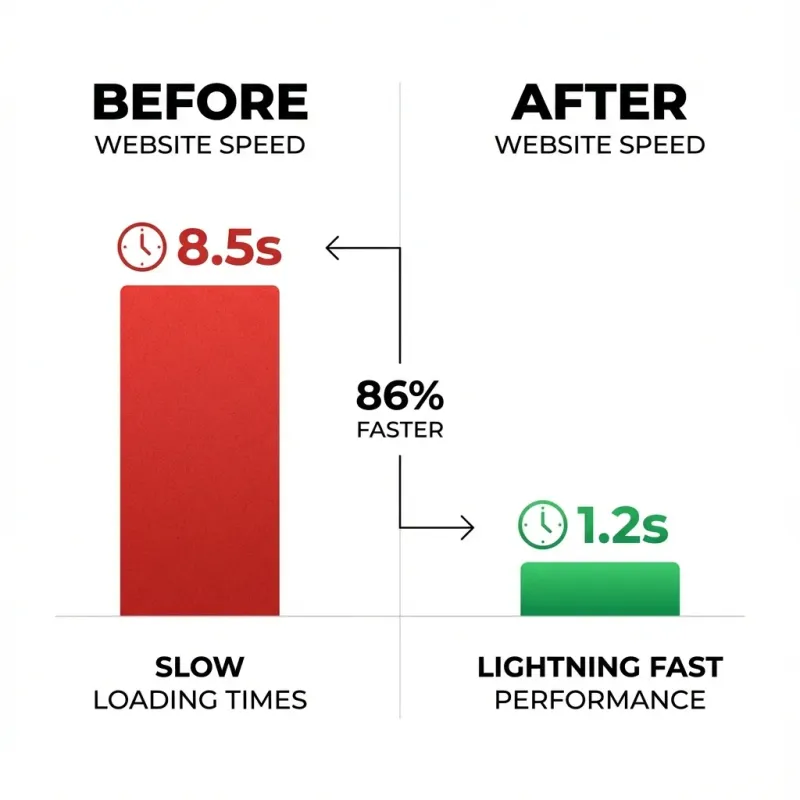
Visual comparison of load times before and after implementing caching, image optimization, minification and CDN for a Northbridge bar. (Image will be added later.)
You Don’t Have to Start Over to Speed Up
A slow hospitality website hurts your bookings, your SEO and your brand. But you don’t need to throw away your current site and spend months on a rebuild. By systematically applying caching, image optimization, code minification and a CDN, you can achieve dramatic speed improvements—often in a matter of days—while keeping the design and content you already have.
At Amplify Creative Lab, we specialise in performance‑tuning existing hospitality sites. Our “Speed‑Without‑Rebuild” audit identifies the exact bottlenecks slowing your site and provides a clear, prioritised action plan to fix them.
Ready to Fix Your Slow Site?
Curious how your current site performs? Test your site speed and request a free mini‑audit. We’ll analyse your Core Web Vitals, pinpoint the low‑hanging fruit, and show you exactly how to improve performance without rebuilding everything. Turn your sluggish site into a fast, conversion‑friendly asset that Google—and your customers—will love.